
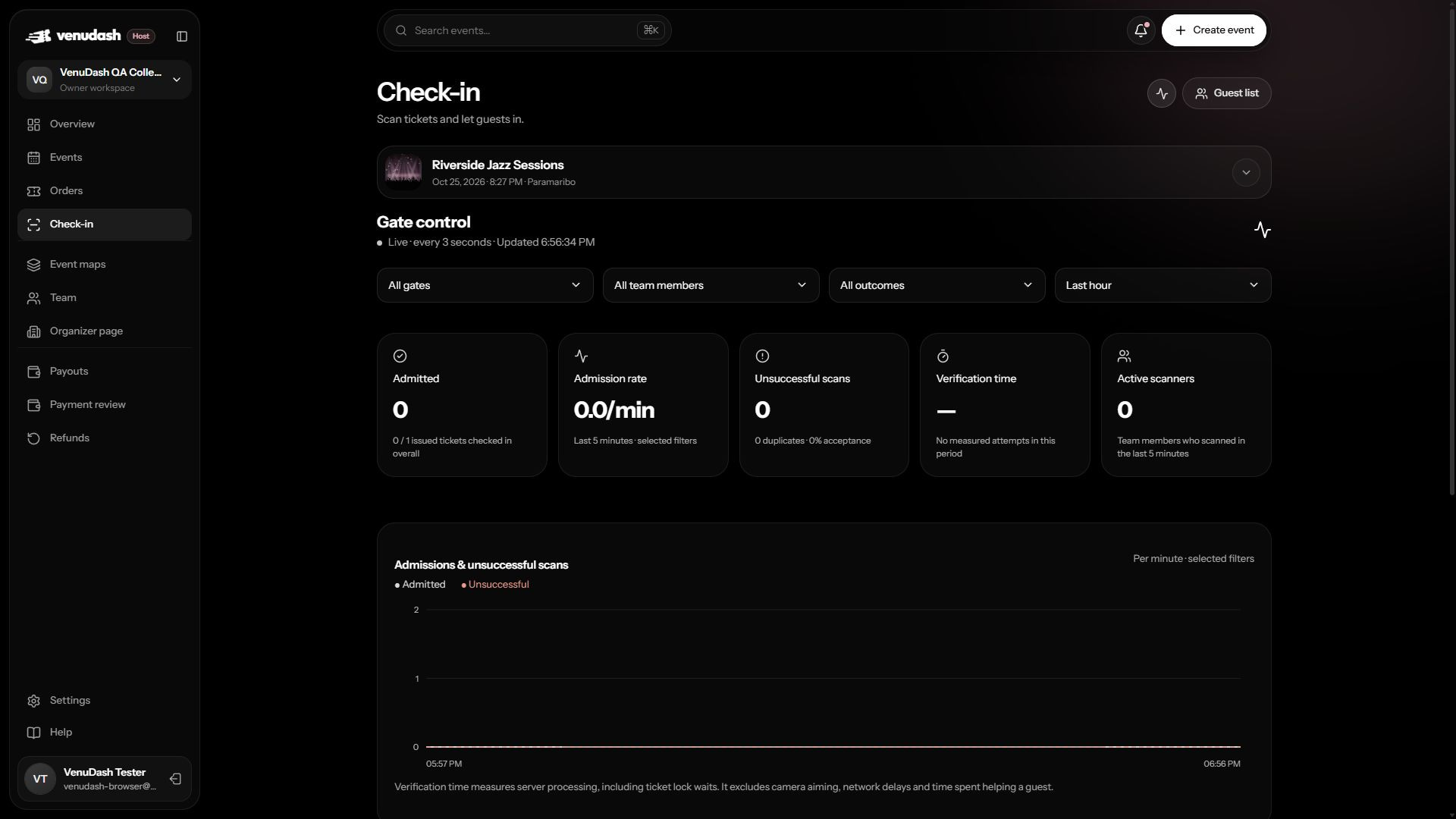
Use Gate control
- Open Check-in for the event and choose Gate control when your role allows it.
- Filter by gate, scanner, outcome, and reporting period.
- Read admissions and unsuccessful scans per minute, then inspect the activity table for individual attempts.
- Use Earlier scans for historical records and Back to live activity to return to the latest activity.
What the activity record shows
Each attempt can include its time, guest or ticket reference, result, scanning team member, gate, device label, and verification duration. Use these together when investigating duplicates or a particular station’s failures.
Gate control refreshes every three seconds while active. An interrupted-update message means the display may be stale; check the last update time before drawing conclusions.
Queue estimates
Create named gates and have staff report the number of people currently waiting. The estimate uses that count and recent admissions to estimate clearance time. Counts become stale after five minutes.
A queue estimate is not a measured waiting time. Verification duration measures server processing, including ticket lock waits; it excludes camera aiming, network delays, and time spent helping a guest. Admissions alone do not measure venue occupancy because exits and re-entry are not automatically counted here.
Respond to a change
A rising queue with steady admissions may need more staff or better preparation before the scanner. A spike in unsuccessful scans calls for checking the selected event, device connection, and result reasons. Use the individual records to investigate before changing admission policy.